

Empower Data Platform v1.44
Key Changes & Improvements🔃 Power BI Table Level Refresh: Selectively refresh individual tables in Power BI datasets during Publish Tasks to reduce runtime and compute usage.
⏰ Advanced Scheduling: Gain more control over workflow execution with expanded scheduling options, exclusions, and recurring patterns.
🔌 Multiple IR Hybrid Environment Support: Map multiple Integration Runtimes to a single Connector type across on‑prem, cloud, and hybrid environment setups.
✨ Multiple Quality of Life Improvements: Cluster configuration is now available for Publish to Target Publish Tasks, easily view detail error messgaes related to a Data Migration, and Extend Tasks now support running any ADF pipeline.
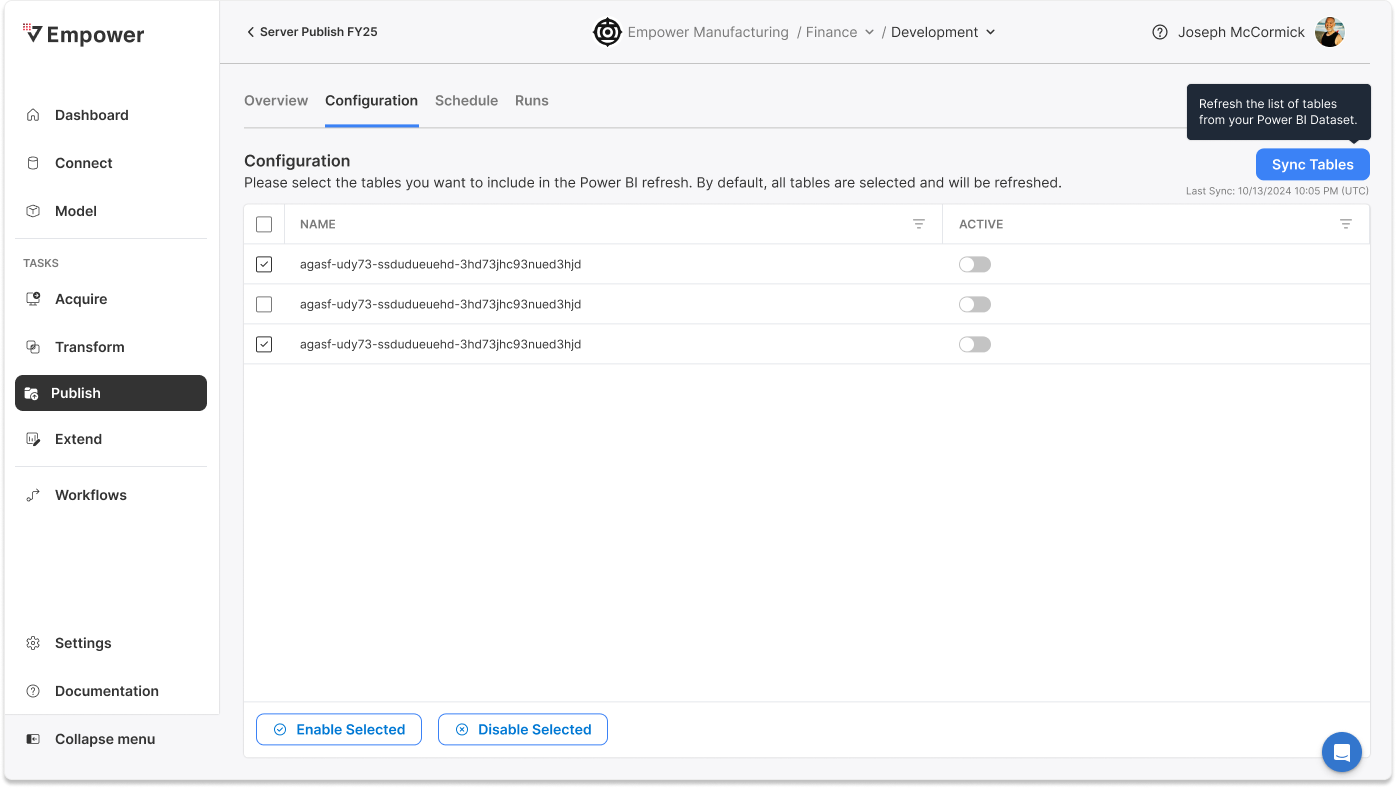
Power BI Table Level RefreshYou can now control exactly which tables in a Power BI dataset are refreshed during a Publish Task. Instead of refreshing the entire dataset every time. Navigate to the configuration tab of a Publish Task to select only the tables that have changed and adjust refresh frequency as needed.
Power BI is also now supported as a Connector type, allowing connection details to be defined once and reused across tasks. This reduces execution time, lowers compute costs, and simplifies configuration.
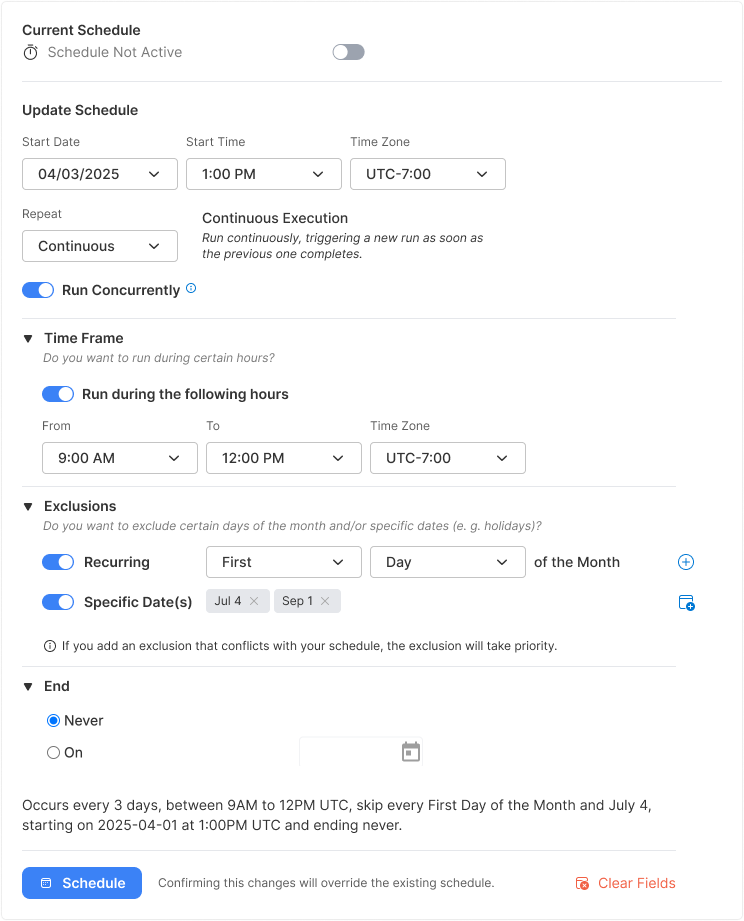
Advanced SchedulingScheduling with Empower now gives you significantly more control over when Workflows and Tasks run. In addition to standard interval-based schedules, you can now define more precise execution patterns that better reflect real business operations.
With Advanced Scheduling, you can now also:
- Choose to run on a contunious basis where the next run will immediately kick off after the previous run completed.
- Define specific run times and limit execution to a configurable time window, such as limiting runs to after business hours.
- Add exclusion rules to skip specific dates or recurring periods, such as holidays or month-end blackout windows.
- Control concurrency behavior to prevent overlapping runs when a previous execution is still in progress.
These enhancements allow teams to reduce unnecessary runs, avoid peak-hour processing, and eliminate manual scheduling workarounds, resulting in more predictable, efficient, and business-aligned automation.
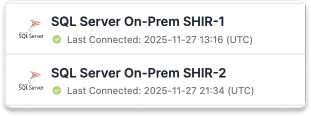
Multiple IR Hybrid Environment SupportEmpower now supports mapping multiple Integration Runtimes to a single logical source type across different environments, including on‑prem, cloud, hybrid, and multiple self‑hosted IRs. This removes previous deployment limitations for hybrid architectures and enables more flexible, enterprise-ready connectivity across customer environments.
Quality of Life Improvements⚙️ Cluster Configuration for Publish
Publish Tasks that are "Publish to Target" now allow you to customize the Spark cluster configuration used during execution, including cluster type and node sizing. This gives teams better control over performance, scalability, and cost. Learn More →⚠️ Data Migration Error Visibility
When a data migration fails, you can now view the full error message directly in the UI. This improves troubleshooting and reduces guesswork during environment promotion.🧩 Extend Tasks – External ADF Support
Extend Tasks can now execute pipelines in external Azure Data Factory instances, rather than being limited to the Empower-managed ADF. This enables tighter integration with existing customer ADF investments and broader orchestration scenarios. Learn More →
Itemized Changelog
Enhancements & Features
- Advanced Scheduling Enhancements: Introduced a new scheduling foundation with support for advanced intervals, validation, policy evaluation, guard integration, and expanded schedule options across Tasks and Workflows.
- Power BI Table Level Refresh: Added support for refreshing individual tables during Publish Tasks and introduced Power BI as a first-class Connector.
- Multiple Integration Runtime Hybrid Support: Improved support for multiple IRs and SHIRs across hybrid environments, including corrected naming conventions and routing.
- Publish Cluster Configuration: Added the ability to configure Spark cluster settings for Publish Tasks, including integration with ADF.
- Extend Tasks – External ADF Support: Added a configuration panel to run pipelines in external Azure Data Factory instances and improved Extend Task configuration and metric routing.
- Data Migration Enhancements: Added a View Error modal for failed migrations and improved safeguards to prevent concurrent migrations.
- Dashboard Performance Improvements: Optimized dashboard object charts to better support large datasets.
- Ingestion Performance Optimizations: Improved Spark ingestion efficiency with configurable schema post-processing, optional DataFrame caching, scoped deduplication, and asynchronous telemetry logging.
- API Telemetry Improvements: Added asynchronous telemetry logging to improve API performance and observability.
- Connector Enhancements:
- Added Power BI Refresh Connection support.
- Updated SAP SAC connector.
- Added rich text fields to source types.
- Hid Batch Extraction options for Custom Sources.
- Task & Workflow Usability Improvements:
- Added filters to additional task columns.
- Improved task page loading behavior.
- Fixed long task name truncation in Overview pages.
- Modeling & Metadata Updates:
- Moved search bar on Entity and Entity Column pages.
- Updated Transform description column to align with model metadata.
- Added Power BI metadata to the Metadata Catalog.
- Data API Improvements: Optimized the
/object-ingest-deltaendpoint and added org metadata to ASB payloads. - Notifications Reliability Improvements: Improved handling of invalid payloads from notification subscribers.
Bugfixes
- Fixed Extend Task failures for Fabric Data Pipelines and Fabric Notebooks when Self-hosted Integration Runtime was offline.
- Resolved ADF and SHIR naming convention issues related to Multiple IR support.
- Fixed regression where Fivetran ADLS workflows appeared as failed despite successful runs.
- Addressed extraction failures for SAP Concur connectors.
- Fixed issue where ADF Extend Tasks failed when executed within Workflows.
- Corrected model list sorting to ensure most recently modified models appear first.
- Resolved errors when saving or testing SHIR and ADF connectors.
- Fixed Power BI connector metadata refresh failures resulting in 422 errors.
- Addressed scheduler errors including inconsistent schedule summaries, 400 errors when saving schedules, and mismatches between overview and configuration views.
- Fixed Transform Run Blade status bar display issues.